- Feb 23, 2024
Blogging in 2024 using Podia and Notion - The Perfect Blogging Pair
- Brittany Hardy
- Tips and Tricks, Podia Help
Looking for Podia website design or marketing support?
CLICK HERE to see my next available free ☕️ chat
Blogging - the complete guide (the fun way!) using Podia and Notion
If you prefer to watch the blogging workflow instead of reading it, here is the video version:
Just for funsies… let’s drop some “history of blogging” stats first… you know… just to make us feel a little older than we already feel ;)

History of Blogging
Blogging originated in the late 1990s with the creation of weblogs.
Early bloggers included Jorn Barger, who coined the term "weblog," and Dave Winer, considered one of the "fathers" of blogging.
The term "blog" was coined in 1999 by Peter Merholz.
Blogs gained popularity in 1999 with the arrival of the first hosted blog tools.
Blogs were recognized as a valuable news source in the early 2000s, particularly during the Iraq war.
Politicians and political candidates began using blogs in 2004.
The blogging community further expanded in 2005, with the incorporation of blogs in mainstream media.
In 2012, Evan Williams of Pyra Labs launched Medium, a publishing platform for writers, marking a shift in the blogging sphere.
Despite declarations of the death of blogs, they continue to exist with over 500 million blogs or blog-like sites as of 2019.
Blogging Stats:
The term "weblog" was coined in 1997.
The term "blog" was coined in 1999.
Blog usage spread during 1999.
Blogs became mainstream in 2004.
Global Voices Online, a blog aggregating site, surfaced in 2005.
In 2011, a blog purchased a newspaper for the first time.
The publishing platform Medium was launched in 2012.
As of 2019, there are an estimated 500 million+ blogs or blog-like sites worldwide.
It’s no secret that in today’s world, everyone turns to the internet and online searches to find helpful content, get their questions answered, and consume entertaining content - enter Blogging!
Blogging seemed like it had already had its payday (back in say early 2000s - my millennial heart misses those days!!), but boy has it made a comeback!

Ok maybe it’s not so much a comeback… but a shift BACK to something that worked, and we navigated away from it because social media gave us shiny object syndrome for a while ;)
It seems like we are constantly vying for everyones attention on social media and as a business owner especially, it can feel like a never-ending uphill battle because apparently no one can pay attention longer than 10 seconds anymore (gee thanks TikTok and short form video).
I may be the odd-one out, but I actually prefer reading content over video (in most cases unless it’s really technical), and I enjoy writing. I also enjoy a well crafted article, and I can appreciate the effort behind a good ole blog.
What I don’t love is AI garbage that hasn’t been edited, nor do I love a blog that is stuffed with ads popping up all over the place. I want solid information, and I am a sucker for an entertaining story weaved throughout. I spent all my energy this time on the video form of this one, so no entertaining stories for you this time my friend 🤣
What happens if you put all your eggs in the social media basket and neglect blogging?
I have heard countless stories (and experienced this myself yikes!) from business owners who put all their eggs in the social media basket and neglected their websites and email lists only to have their social accounts hacked or shut down. It’s not pretty.

What is worse, is that when the business owners do get their accounts back, some of them fail to recognize that it’s only going to happen again and that the only way out of the cycle of relying on social media for business is to take control of their own strategy to drive organic traffic to their website using blogging (and growing their email lists!).
So that’s the purpose of today’s blog post… I want to show you how you can leverage two simple tools to outline, draft, optimize, and publish your blog post, so that YOU can take control of your own marketing, and leverage tools that will serve you for the long haul.
I would like to introduce you to: Notion + Podia = The Blogging Dream Team!
Notion + Podia = The Blogging Dream Team!
What is notion and what is podia?
Notion is a comprehensive tool that is revolutionizing content creation. It provides a space for brainstorming and drafting content with ease. Notion's features include creating templates for your blog posts, organizing your thoughts with its advanced note-taking system, and even using AI to generate content ideas. It's an excellent tool for creating high-quality blog content. (spoiler alert… that was the definition that notion ai gave me hah!)
My definition of notion: My all-in-one crazy brain dump tool that organizes the chaos that is my ADHD entrepreneur mom of 4 mind and keep my data in one place so that when I say “what the heck was that idea I had again?”, I know I can log into notion and it’s there.
I’m not kidding though, notion is literally my life haha. I have a personal dashboard with goals, family Christmas gift lists, rental property management dashboards… even kids school portal logins. And on the business side, I run my entire agency using notion to keep my team on track and client projects ticking along.

You can see in the video at the top of this post that I also use notion to help me in the content creation process. I use it to keep my list of ideas, draft my content, AND keep my content library. Hooray for backups and repurposing content later!
If you’ve been curious about notion and want to give it a try, you can CLICK HERE and check it out! Most people can get by with a free account for quite some time. I use the paid account (which is only $5 a month right now) so that I can have unlimited storage, and boy do I take advantage of that!
In the video (at the top of this post), I walk you through my actual process of drafting an article start to finish and optimizing it.
Here is a list of what I do in order if you want to copy and paste it to make your own blog workflow:
[ ] brainstorm topic (look on google for what people are searching for!)
[ ] use notion ai to brainstorm outline
[ ] use notion ai to write draft
-
[ ] SEO Optimizations
[ ] length at least 1000 words
[ ] Headings and subheading for each section
[ ] Check keywords - place notes into keywords section
[ ] Images with alt text, 1 per section
[ ] FAQ section at bottom of post
[ ] Human written title
[ ] keyword stuffed URL
[ ] Internal links
[ ] Meta description
[ ] Add call to action
[ ] Add a freebie or pop up
[ ] Add affiliate links
[ ] Record and embed YouTube Video
[ ] Publish on website (podia)
[ ] Share on social media (use notion ai to write/draft caption idea)
[ ] Add to next weeks newsletter if applicable
But, before you hit publish on Podia, you need to write your blog post!
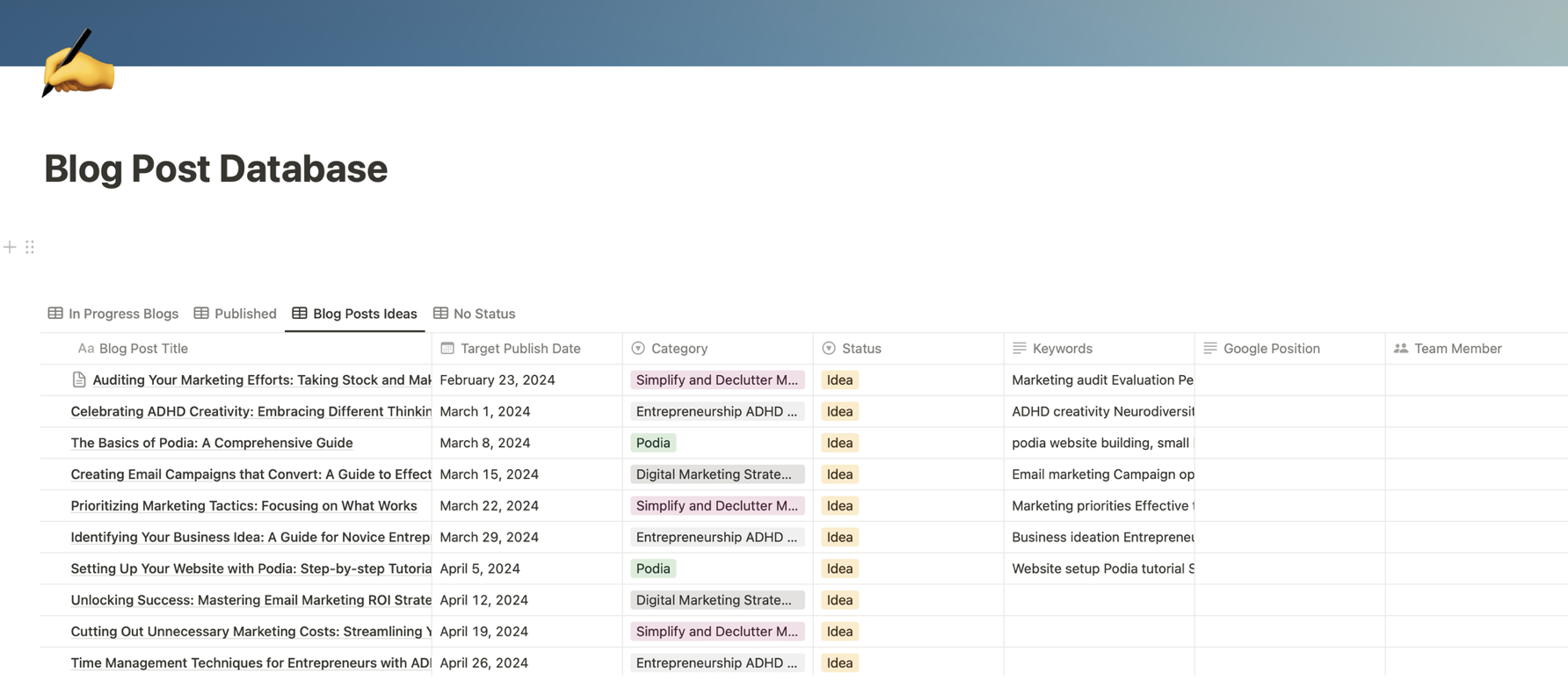
In notion, I store my ideas, write my outline and my draft, and then optimize with links and images.
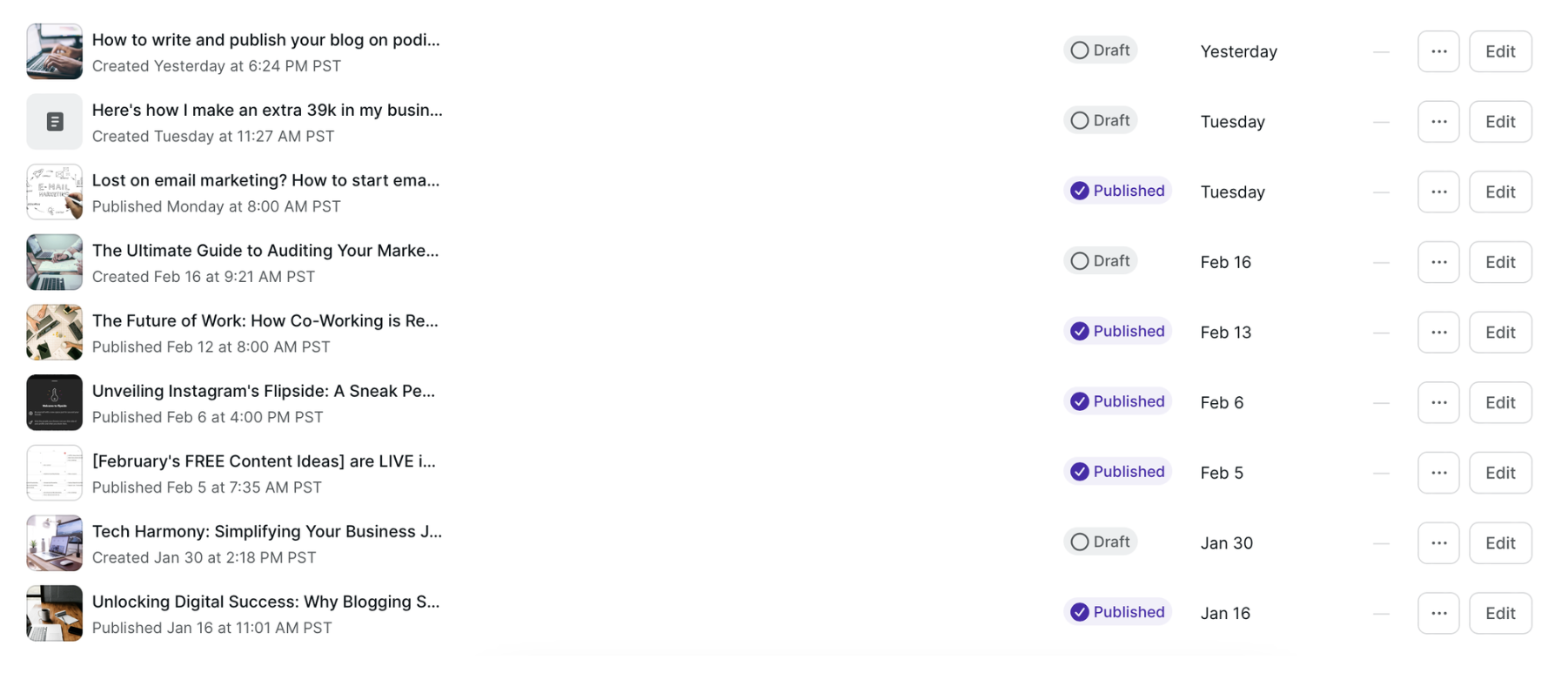
Then it’s over to podia to paste in my blog post and go through the SEO optimization checklist!
Why use notion to brainstorm and store blog content?
So you might be asking, why not just use google docs (or heaven forbid Microsoft word… please say it isn’t so haha!)?
If google sheets and docs work for you, then keep on keeping’ on my friend!
The name of the game is just creating a consistent habit of publishing valuable content that will get your business in front of your ideal audience (it’s visibility!). If you have a system that works, then use that.
But if you’re anything like me and you want everything in one place - especially your content, then you might want to consider notion. You can see in the YouTube video how the content is backed up here for future use and can be sorted in different ways.
Why use podia for your blog?
There are lots of platforms to write blogs on, with the most popular still being WordPress. And no shade to WordPress sites, because I build those for client too!
But for all of the awesome things that Wordpress is… it’s not exactly user friendly for a business owner to manage themselves. At least not until they get some training that is, and my guess is, you have more important things to do in your business than learning the ins and outs of a website platform - that's why podia is my go to!
It’s not impossible, and I launch Wordpress sites with blogs for clients often - but what usually happens is they come back 6 months to a year later and say:
“Hey Brittany, the site you built is beautiful, and I know you built it how I asked… but no one is finding me on google… how do I fix that?”
Well… the harsh truth is that your website is never truly “done”. And what’s more is that you can’t expect to launch your site, never update it again and then just have people find you magically.
It’s not “build it and they will come”.

You have to invest time, energy, and sometimes money into creating content so that there is a reason for people to visit again, and a reason for Google to see your site as an authority in your space and show your site as a choice for potential customers searching online.
So... those clients with awesome Wordpress sites have a kick-butt base to work from, but they still need to do the same amount of work to create and publish content as anyone else. They dont have a magical unicorn website just because they paid someone to make it look pretty.
This is exactly why I almost always recommend podia as the clear platform winner for entrepreneurs and business owners because not only is the course and membership functionality fantastic, but the website builder and blogging platform is extremely easy to use and maintain.
This is so important for business owners to have something that they can manage themselves (and podia is that platform!).
And bonus points if it’s hard to break (I’m talking to you WordPress clients who break our gorgeous designs 😜).
If you want to check out what Podia is all about, you can CLICK HERE to get a free trial. They actually have a completely FREE account that still has access to the website builder and everything podia has to offer. Currently the blogging platform is in Beta and will be released soon to everyone!
My entire website is built on podia (the one you’re on right now!), so you can rest assured it can be as fully featured as you need it to be ;)
The Benefits of Using Notion and Podia Together to Write and Publish your Blog Posts
While notion makes it easy for you to draft and store content, podia makes it easy to publish your blog itself, and honestly, it probably couldn’t get any simpler.
You can see in the video that once I have my blog drafted, I simple paste it into the podia blog editor.
This is where I optimize for SEO (reference the checklist from the top of this article) and where I link internally to other parts of my website.
My blog content is also repurposed to my newsletter (or vice versa) which is ALSO inside of podia (win!).

Once I’m done my article, I can open up my next newsletter draft and add it there - I’m a big fan of repurposing content, especially if it’s something like this that I’ve spent a lot of time creating.
I should also mention that because Podia also hosts your digital products, it’s crazy easy to link to and embed your offers inside of your posts (no more toggling between multiple systems!)
Some tips for writing an effective blog post (using podia!):
When drafting your blog post, keep these tips in mind:
Keep your paragraphs short and punchy to improve readability
Use bullet points and lists to break up text and make it easier to digest
Add subheadings to each section to improve SEO
Try to make your content as simple (language) as possible so that your audience isn’t lost in technical jargon (if you have a long writing style like I do, it sometimes helps to publish your draft and then have someone else go in later and edit and break things up for you).
Use google search to put in keywords to find out what questions people are asking… this is a great way to uncover blog post topics that might bring traffic to your website
Don’t just use AI content! While AI is helpful to help you brainstorm and create a draft framework, you do NOT want to publish AI content as it is, it’s just “meh”
Optimize after! DOn’t get stuck on optimizing the whole thing before you publish. Just focus on getting it out, and then go back to optimize later! This can include adding more images, adding FAQs, adding internal links or affiliate links etc.
Keep going! Blogging isn't something that’s going to give you instant results, but if you're patient and consistent, you should see traffic coming to your website that you wound’s have otherwise, and if you continue to optimize your website to collect email subscribers etc, then you’ve got the magic down!
Step-by-Step Guide to Publishing a Blog Post with Podia
Log into your podia dashboard (if you need a free account, you can CLICK HERE)
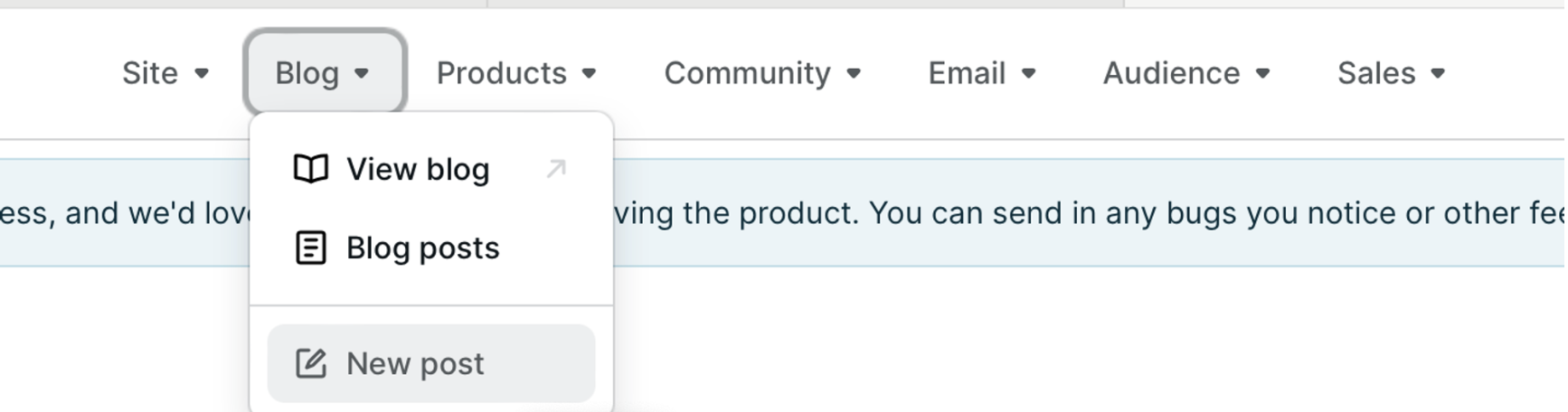
Go to “blog” and then “new post”
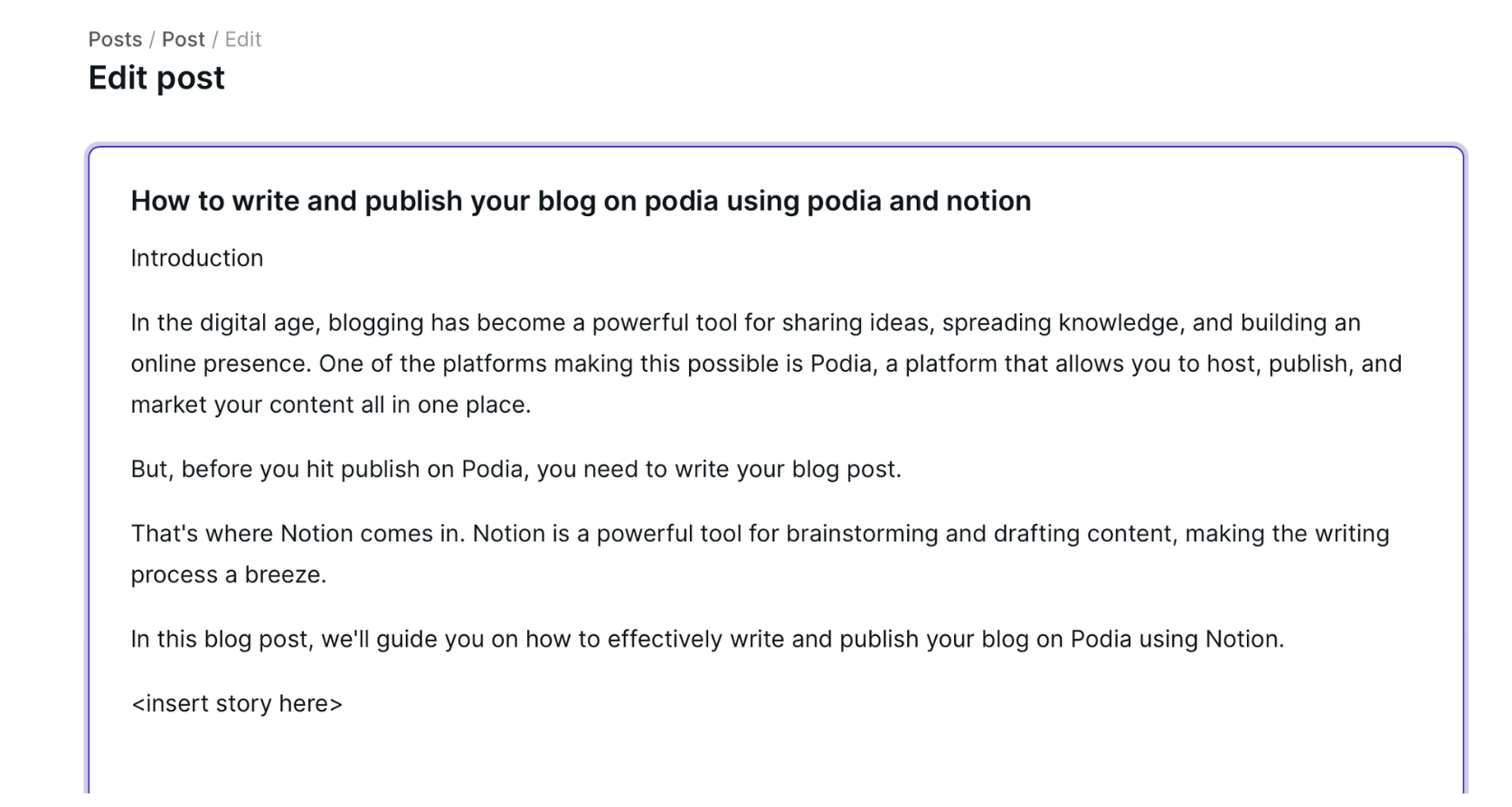
Paste in the blog content you’ve drafted (I would always recommend drafting in notion or google docs FIRST). You always want a backup copy in case you get kicked out of your website or something happens and you didn’t get that dang auto-save!
-
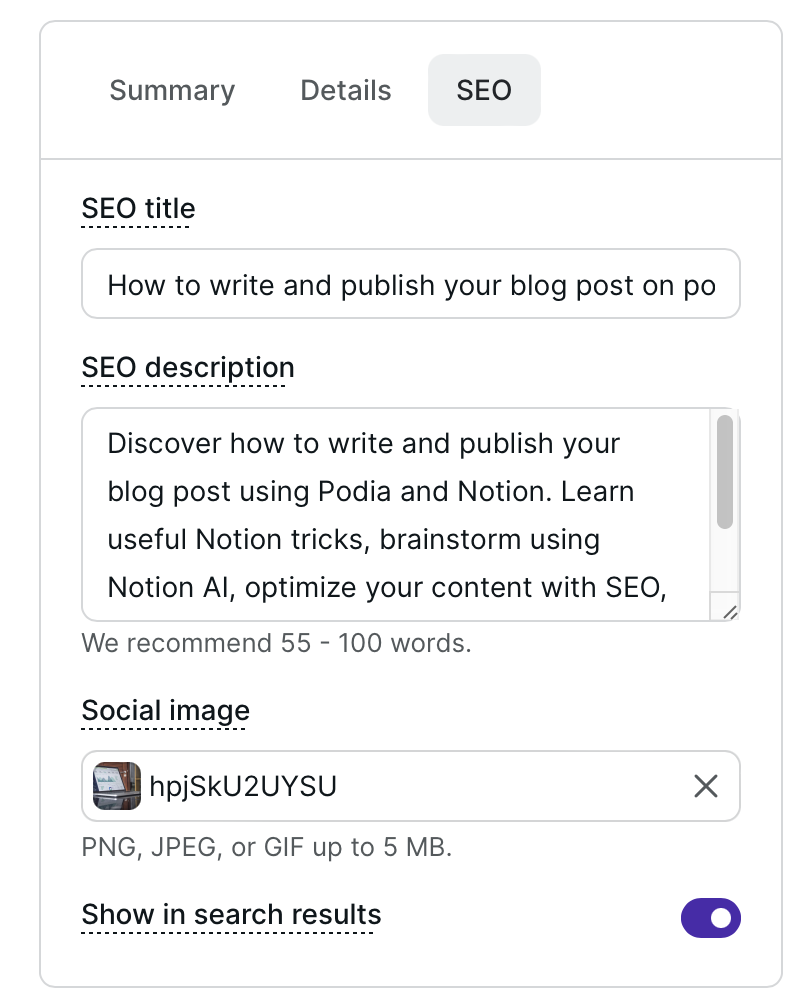
Fill in the summary, details, and SEO tabs to the right of the podia blog area. You can customize:
author name
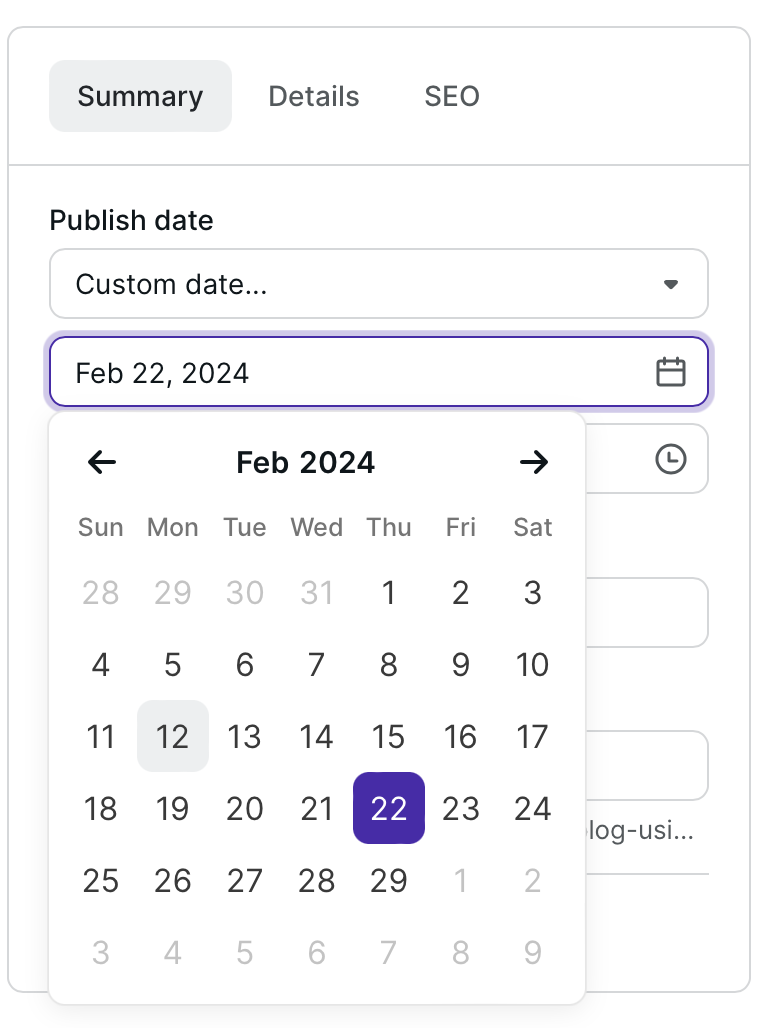
publish date
link
featured image
except
comments on or off
seo title
seo description
seo image
-
if blog is visible in search or not
Then publish that bad boy!
Promise me one thing - that you will try to create even one great blog post each month and go back the next month to optimize a previous one. Just one! Try it!
You don’t have to blog every week like I am doing right now, you just have to find a schedule that feels right for you, and one that you can be consistent at.
And guess what… worst case scenario… you take a break and then you batch some articles and use the “publish on past date” feature to make it look like you never took that time off in the first place!
There are lots of fabulous writers out there that can help if you get stuck, and some of Podias very own Podia Pros (yes… I am one of them wink wink) can help you set up your blog and write amazing content - keep your options open if you want to blog but can’t quite wrap your head around DIYing it just yet.
What’s next? Once you publish your blog on podia and optimize it… will people just find it on google?
Well… sometimes.
If your topic is something that is searched often, then yes, google will send traffic and clicks your way.
And if your topic is a bit more niche or it needs to be shared to get some traction, then here are 10 ways you can share your blog post to get more eyeballs on it:
Share a link to your blog post on your personal and business social media accounts, including Facebook, Twitter, LinkedIn, and Instagram.
Create a short teaser video about the blog post and share it on YouTube and TikTok.
Include a link to the blog post in your email newsletter.
Collaborate with other bloggers or influencers and request them to share your blog post.
Submit your blog post to relevant online communities or forums, such as Reddit or Quora.
Use the blog post as an answer to relevant questions on Q&A websites.
Share your blog post in groups or communities related to your blog's niche on social media platforms.
If your blog post can help solve a problem, consider sharing it on customer support forums or help centers related to your topic.
Create infographics or other visual content based on your blog post and share it on Pinterest or Instagram.
Consider doing a guest post on other blogs and include a link to your blog post in your author bio.
Blogging using Podia and Notion - the official conclusion
Blogging may be new to you, or it may be something you have done in the past and you're ready to get back into it. It can seem daunting, but the truth is it's as easy or as hard as you make it... so do yourself a favour and make it easy on yourself by choosing a platform that helps you get it done quicker and with less resistance!
Using notion will help you keep a bank of ideas and draft your content. Combined with podia to publish and host your blogs, you've got a winning combination!
Remember, every blog post you write and publish not only adds to the richness of the internet but also has the potential to educate, inspire, and make a difference in someone's life. This is the power you wield when you choose to share your ideas with the world. So... what are you waiting for?

-Brittany, Owner | Empty Desk Solutions and Certified Podia Pro
FAQs about Using Podia and Notion for your Blog
What is Notion and how can it help with writing a blog post? Notion is a comprehensive tool that aids in content creation. It provides a space for brainstorming and drafting content with features like creating templates for your blog posts, organizing thoughts with its advanced note-taking system, and even using AI to generate content ideas.
What is Podia and how does it aid in publishing a blog post? Podia is a user-friendly platform that makes publishing your blog post easy. It also offers features for SEO optimization and promoting your blog post.
Why should I use Notion and Podia together for blogging? Notion and Podia together make a powerful combination for blogging. Notion assists with the drafting and brainstorming phase, while Podia is ideal for the publishing and promoting phase.
What are some tips for writing an effective blog post? Keep your paragraphs short, use bullet points and lists, add subheadings to each section, try to make your content as simple as possible, and always optimize your content for SEO after drafting.
How can I share my blog post after publishing it on Podia? You can share your blog post on your social media accounts, create a teaser video, include a link in your email newsletter, collaborate with other bloggers, submit it to online communities or forums, and use it as an answer on Q&A websites.
How often should I blog? The frequency of blogging can depend on your schedule and content strategy. However, consistency is key. Even blogging once a month can be effective if you're consistently providing valuable content.
How can I optimize my blog post for SEO on Podia? You can optimize your blog post for SEO by ensuring it has an appropriate length, proper headings and subheadings, keywords, images with alt text, a FAQ section, a human-written title, a keyword-stuffed URL, internal links, a meta description, a call to action, and more.
What happens if I put all my eggs in the social media basket and neglect blogging? Neglecting blogging and focusing solely on social media can lead to a lack of organic traffic to your website. Blogging helps to drive organic traffic and allows you to have control over your own marketing strategy.
Why is it suggested to draft the blog post in Notion or Google docs first before pasting it into Podia? Drafting in Notion or Google Docs first allows you to have a backup copy of your content in case something happens during the publishing process on Podia.
Who can benefit from using Notion and Podia for blogging? Anyone who wants to simplify their blogging process can benefit from using Notion and Podia. It's especially useful for entrepreneurs and business owners who want to manage their blogs themselves.