- May 11
The Online Café That Helps You Focus (Yes, Really) — Plus the Body Doubling Trick Behind It
- Brittany Hardy
- Productivity, Tips and Tricks, Life Hacks, ADHD Entrepreneur , Magic & Intuition
Looking for Podia website design or marketing support?
CLICK HERE to see my next available free ☕️ chat
You know that feeling when you sit down to work, full coffee in hand, the to-do list is ready... and three hours later you've reorganised your inbox, watched half a YouTube tutorial on something unrelated, and replied to a DM that didn't need a reply yet?
Yeah. Same.
I run a one-woman website design business from a home office and I'll be honest with you... working alone is the dream right up until it isn't. There's nobody walking past your desk to keep you honest. Nobody to glance at your screen and notice you've been on Instagram for 20 minutes. Nobody to say "okay, let's lock in for an hour."
And I have a team that I work with, they are amazing... they keep me focused. But only when we have our planned team days LOL. Every other time I'm on my own, so this is the thing I needed to build.
Something about being diagnosed with ADHD at 38 will do that to you.
So over the last couple of years I've quietly become obsessed with focus strategies. Coworking sessions. Body doubling. Pomodoro timers. Ambient sound. Online café videos on YouTube. All of it.
And then... I built my own.
I'll get to that in a minute. But first I want to talk about why this stuff actually works. Because if you're a solo business owner, a freelancer, a course creator, a coach, a writer, a student, or honestly anyone who has to motivate themselves to do hard things without a manager standing over you... this might genuinely change your work week.
Why working from home is harder than anyone admits
Let's get one thing out of the way. Working from home is amazing in many ways. No commute or fluorescent lights (those gave me crazy migraines!). You can wear slippers or put on a load of laundry between meetings. You can take a walk at 2pm just because (or like me you can walk the kids to and from school).
But the focus problem is real.
When I was first building Empty Desk Solutions, I assumed the hardest part would be getting clients. It wasn't.
The hardest part was getting myself to actually do the work every day. There's a particular kind of loneliness that comes with solo work that nobody warns you about. It's not the kind that makes you want to cry though... it's the kind that makes you check your phone 40 times a morning.
There's no peer pressure and no glancing at your coworker's screen. And there's definitely no quiet hum of other humans being productive in the same room.
And our brains... do not love that.
Turns out we're wired to focus better when other people are around. Even if those people aren't talking to us. Even if they're a thousand miles away on a video call. Even if they're just a name on a screen. Which brings me to...
What is body doubling? (And why it's not just an ADHD thing)
Body doubling is the practice of working alongside another person to help your brain stay anchored to a task. The term comes from the ADHD world and it describes how having another person present (even passively, even just on a video call) makes it dramatically easier to focus and follow through.
The body double isn't there to help you. They're not your accountability buddy in the traditional sense. They're just there. And somehow that's enough.
I'm not going to pretend I understand the neuroscience perfectly (because I don't!), but here's what the research and the lived experience both seem to point to...
Accountability without judgment. You said out loud you were going to write the email. Now there's a witness.
Social presence calms the procrastination loop. Your brain stops trying to escape the task because the task is no longer scary and solo.
Time becomes visible. When you commit to "the next 50 minutes" with another human, the time stops being squishy. It becomes a container.
It short-circuits the "I'll start in 5 minutes" lie. You can't keep lying to yourself when someone else is already working.
👉 You don't have to have ADHD for body doubling to be wildly effective. Most of us are just trying to focus in a world designed to fragment our attention into a hundred pieces. Of course it works.
Coworking: body doubling, but with structure
Coworking, in the freelancer and small business world, is basically the grown-up version of body doubling. You hop on a video call with one or more people, say out loud what you're working on, mute yourself, and just... work. At the end you check in. Did you do the thing? Cool. Next round.
The format is almost embarrassingly simple. But it works every single time for me. Here's how a typical session goes...
1. Open with intentions (5 minutes). Everyone says what they're working on and what "done" looks like for this block. Out loud. Specifics matter. "Work on my website" is not a goal. "Finish the homepage hero section copy" is.
2. Mute and work (25 or 50 minutes). Cameras can be on or off, doesn't matter. Mute your mic. Some people like background music or ambient sound, others like silence. The key is that the call stays open.
3. Check in (5 minutes). Did you finish? What got in the way? What's the next block going to be?
4. Repeat as needed. A standard Pomodoro cycle is 25 minutes on, 5 minutes off. A longer focus block is 50 minutes on, 10 minutes off. Both work. Match it to your task.
You can do this with one other person, or in a group of 20. You can host it yourself or join one inside a community you're already in. There is no wrong way to do it.
When body doubling is actually the move
Not every task needs a body double. If you're in flow, you're in flow, protect it. But here are the times I find it irreplaceable...
Boring admin you keep avoiding. Invoicing. Expense receipts. Updating your CRM. Filing things in Google Drive. The kind of work that isn't hard, it's just deeply uninteresting and somehow more important than it feels.
Writing tasks where the blank page is winning. Emails to your list. A new sales page. The About Me rewrite you've been putting off since 2022. Knowing someone else is also typing somewhere makes the cursor blink feel less personal.
Long focused work blocks that need protection. Building a client website. Designing a course module. Anything that requires 2+ hours of uninterrupted brain. A scheduled coworking call basically forces you to defend that time.
Days where your brain feels like soup. Hormonal, tired, anxious, distracted, whatever. On those days I genuinely cannot work alone. Hopping on a coworking session is the only thing that gets me moving.
How I ended up building an online café
Okay so here's the story.
For a while now I've been co-hosting coworking sessions inside MarketingClub.ca (an amazing marketing community I'm part of and very much recommend). The members love them, I love them, everyone gets actual work done. Win win win.
I wanted to make the sessions feel more like an experience and less like staring at someone's Zoom desktop. So I started creating little focus backdrop videos... cozy autumn cafés, snowy winter scenes, sunny garden patios. The kind of thing you'd put up on a screen to set the mood.
They turned out beautiful and members love them.
But here's the problem... they took forever to make. We're talking hours per video. Editing, sourcing music, finding the right images, getting everything to loop nicely, exporting in the right format. For one 60-minute focus video. And then if I wanted to change the timer style or swap out the music or try a different scene... I'd basically have to rebuild it from scratch.
I knew there had to be a better way.
So around the start of 2026 I started playing with the new wave of AI tools (Claude Design mostly, because I'm building with it all the time now for client work) and I had this thought... what if instead of pre-rendered videos, I built an interactive web app where you could just pick your own vibe?
Pick a scene. Pick your music. Pick your timer style. Pick whether you want a regular countdown or a Pomodoro cycle. Hit start. Done.
And then... what if I just put the whole thing online for free, no email opt-in, no sign-up, no paywall, no nothing? Because everyone can use a little magic in their work day (and I already have enough lead magnets for my web design business to fill my email list). Especially if you're working from home alone like me.
So I built it.
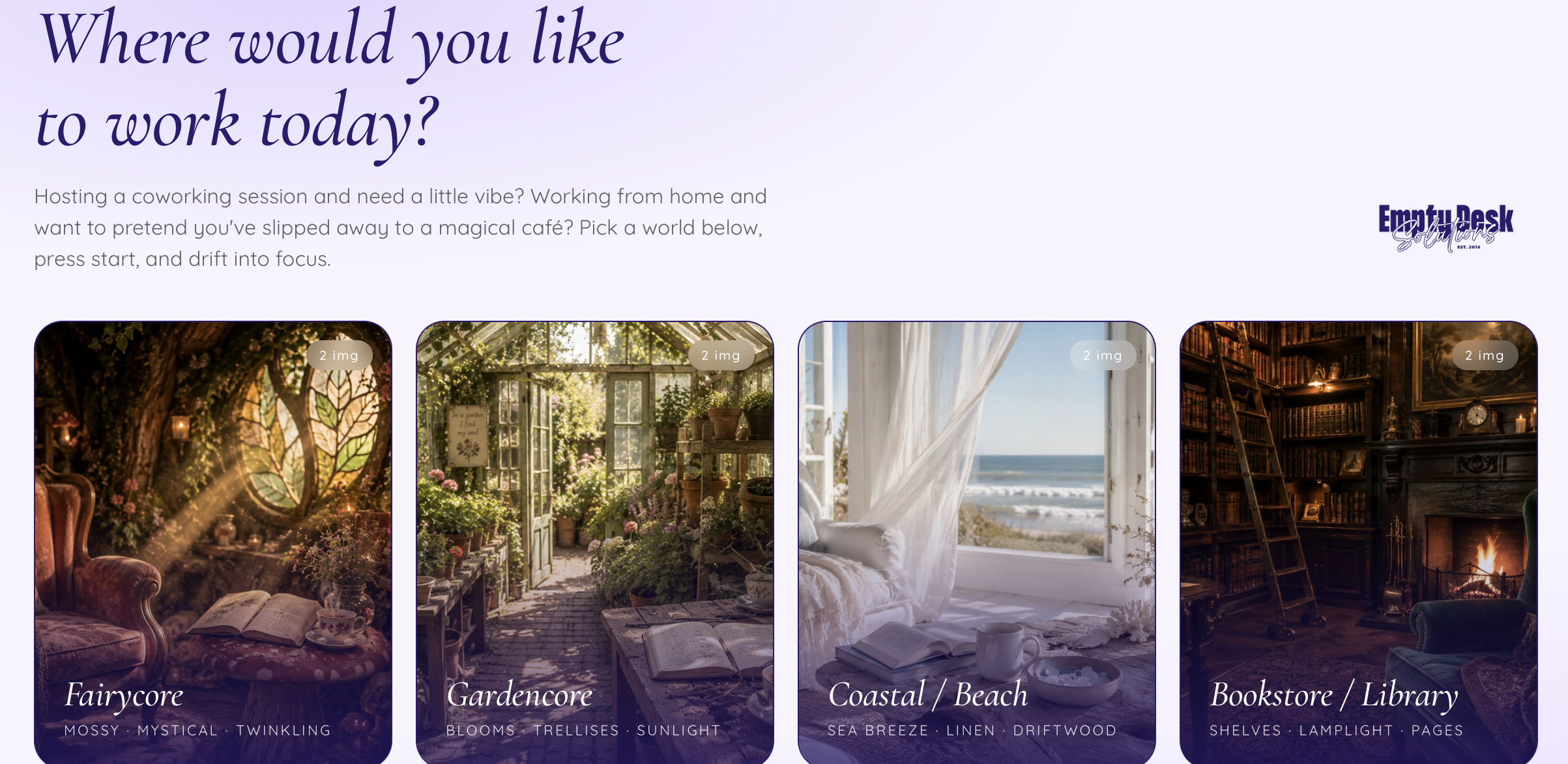
Meet The Magical Café powered by EmptyDeskSolutions.ca · An interactive online café for focused work
It's free and you don't have to sign-up to participate. You just open it and use it.
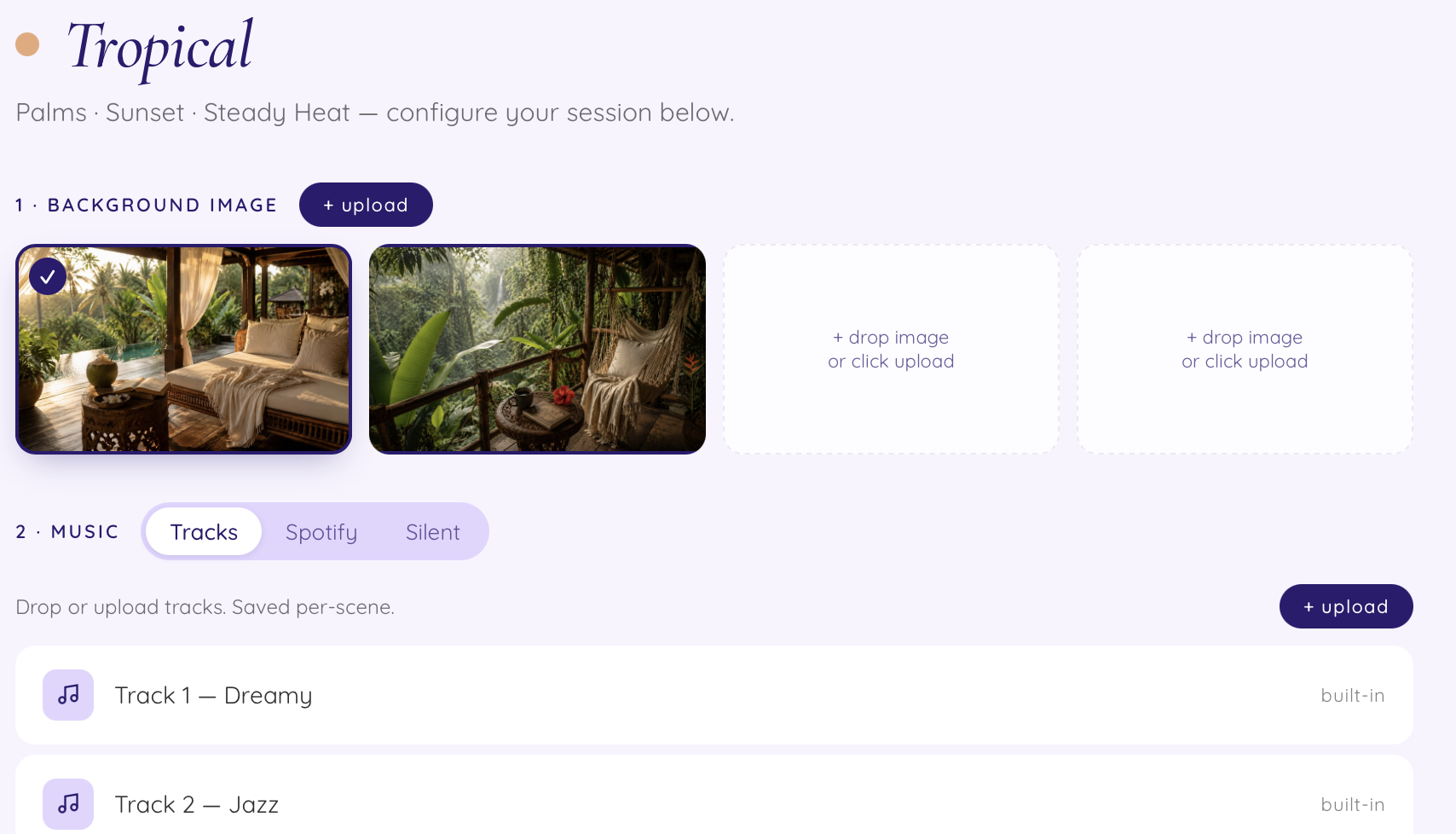
Here's what it does...
9 different scenes to pick from. Fairycore, gardencore, coastal beach house, bookstore library, cottagecore, tropical, cozy winter, city loft, and mountain cabin. Each scene comes with multiple background images and ambient music options.
A built-in focus timer. Run a standard countdown (set your own duration) or a Pomodoro cycle (25 minutes on / 5 off, looping until you exit, with a gong sound at each switch).
Motion options. Add a subtle pan to the background, floating dust motes, steam wisps, or falling snow depending on the vibe.
Choose your timer style. Italic serif, boxed mono, ringed, light sans, dark pill. Tiny detail, but it matters when you're staring at it for an hour.
Bring your own music. Use the built-in tracks, paste in a Spotify playlist link, or set it to silent if you want to play music from elsewhere.
Fullscreen-friendly. Designed to be screen-shared on Zoom for coworking sessions, or screen-recorded once per scene if you want to export an MP4 for reuse.
The intended use is to screen-share it on Zoom when you're hosting or attending a coworking session. But if you want to use it as a focus backdrop on a second monitor while you work alone, as a vibe for your YouTube background, as a way to make studying feel less depressing... Go for it!
I've stopped trying to predict what people do with it ;)
Whatever helps you focus, helps you focus.
How to use The Magical Café for your own coworking sessions
If you host or attend coworking calls, here's the easiest setup...
Open The Magical Café in your browser
Pick your scene, music, timer style, and motion
Hit "Begin session" and then make it fullscreen
In Zoom, click "Share Screen" and pick the browser window
Tell your group to enjoy the vibe and lock in
That's it. No software to install and no account to create! Just a pretty backdrop that holds the time for you.
How to use it solo (when you don't have a coworking group)
If you don't host coworking sessions and don't want to... it works just as well solo. A few ways I use it personally...
Second monitor focus mode. Open it on a second screen while you work on your main one. The visible timer keeps you honest. The ambient scene keeps your brain calm.
Phone-propped focus companion. Open it on your phone, prop the phone up next to your laptop, and use it like a pretty visible Pomodoro timer.
Background ambience for working in a café (the real kind). When the real café you're in is too loud or too quiet, throw on your headphones and play the audio from Magical Café over top.
Wind-down work. I use it in the evening when I'm doing low-energy admin (invoices, emails, light updates). The cosy scenes make boring work feel less boring.
Other focus strategies that actually work
The Magical Café isn't the only thing that helps. Here are a few other focus strategies I've personally tried, kept, and would recommend to anyone working solo from home...
Flow Club (the actual coworking platform). Flow Club is a paid coworking platform where you join live, hosted sessions with a small group. The host facilitates, music plays, and you get an hour of structured focus. I started joining sessions there as a way to stay on track when I wasn't hosting my own, and honestly... game changer. Worth a free trial if coworking sounds like your thing. This is my host link that has a free trial attached. I do host sessions there so you might see me online over there!
Pomodoro with real breaks. The classic. 25 minutes of focus, 5 minutes of break, repeat. The Magical Café has this built in but you can also just use any timer. The trick is to actually take the breaks. Get up. Stretch. Look out the window. Don't just open Instagram during the break, that's not a break.
A daily focus list (not a to-do list). A to-do list has 47 things on it. A focus list has 3. The 3 things that, if I do them today, the day was a win. Everything else is bonus.
Timeboxing the hard stuff before lunch. The harder the task, the earlier in the day I tackle it. My morning brain is sharper than my afternoon brain by a lot. I save the easy admin stuff for the post-lunch slump.
Lo-fi YouTube and ambient sound channels. Yes the lofi girl studying stereotype is real and yes it works. I rotate between that, jazz café livestreams, and rain ambience depending on the day.
Putting my phone in a different room. Petty but effective. The phone has to physically not be within arm's reach or my willpower will lose. I actually almost NEVER have my phone near me while working. If someone is trying to call me it will ring through to my computer and if it's important I can answer it. All other distractions can eff right off ;)
A few honest disclaimers because I'm me
I'm not a productivity expert. I'm a website designer who got tired of losing afternoons to the focus void.
Coworking and body doubling are not a magic fix for burnout. If you're exhausted, you need rest, not a better-looking timer.
The science on body doubling for ADHD is still emerging but the anecdotal evidence is overwhelming. If this resonates, that's a real thing for you.
The Magical Café is free and will stay free. I built it because I wanted to use it. If you love it, the nicest thing you can do is send it to one friend who'd also love it.
So... go play
If you've been white-knuckling your focus and losing the battle, please go try this. Pick a scene that makes you smile. Set a timer. Do one thing.
You don't need a productivity overhaul. You don't need a new app subscription and my god you don't need a 12-week course on time management.
You just need a little structure, a little atmosphere, and (sometimes) another human present, even if they're just a name in a Zoom grid.
Anyways, if you give it a go in a coworking session and it helps... tell me about it. I would loooove to know.
💛 -Brittany
FAQ
What is an online café? An online café (sometimes called a virtual café or focus café) is a website, video, or app that recreates the ambience of working in a cozy café. Usually it includes a visual scene, ambient music or background sound, and sometimes a timer. The idea is to give your brain the same calm focused feeling you get when working in a real café, without having to leave your house.
Is The Magical Café really free? Yes. No email opt-in, account, or paywall. Just open it and use it. I built it because I wanted to use it myself and it felt almost mean not to share it.
Can I screen-record it and use the MP4 in my own coworking sessions? Absolutely. That's one of the intended uses. Record one session per scene and you've got a reusable library you can drop into Zoom calls forever.
Do I have to host coworking sessions to use The Magical Café? Nope. Plenty of people will use it solo on a second monitor or as a phone-propped focus companion while they work alone.
What's the difference between body doubling and coworking? Body doubling is the practice of working alongside another person to help your brain stay anchored to a task. Coworking is essentially the structured version of body doubling for adults with to-do lists. Same idea, slightly different framing. Both work.
Does body doubling only work for people with ADHD? No. Body doubling helps almost everyone focus. The ADHD community popularised the term but the underlying principle (social presence as a focus anchor) applies broadly. Most people benefit from it.
What if I don't have anyone to coworking with? Use The Magical Café solo. Or look for coworking sessions inside communities you're already part of. A lot of Facebook groups, Slack channels, and membership communities host weekly ones. You can also try Flow Club which hosts live coworking sessions you can join. Worst case, ask one business friend if they want to try a session this week. Most people will say yes. If you're looking for coworking with live workshops and templates, check out MarketingClub.ca!
What's the best focus timer for working from home? Honestly, whatever you'll actually use. Pomodoro (25 on / 5 off) is the classic and works well for most tasks. For longer creative work I prefer at least 60 minutes not interupted.
Can I use The Magical Café on my phone? Yes, it's mobile-friendly. Though the experience is better on a laptop or tablet where you can fullscreen it.